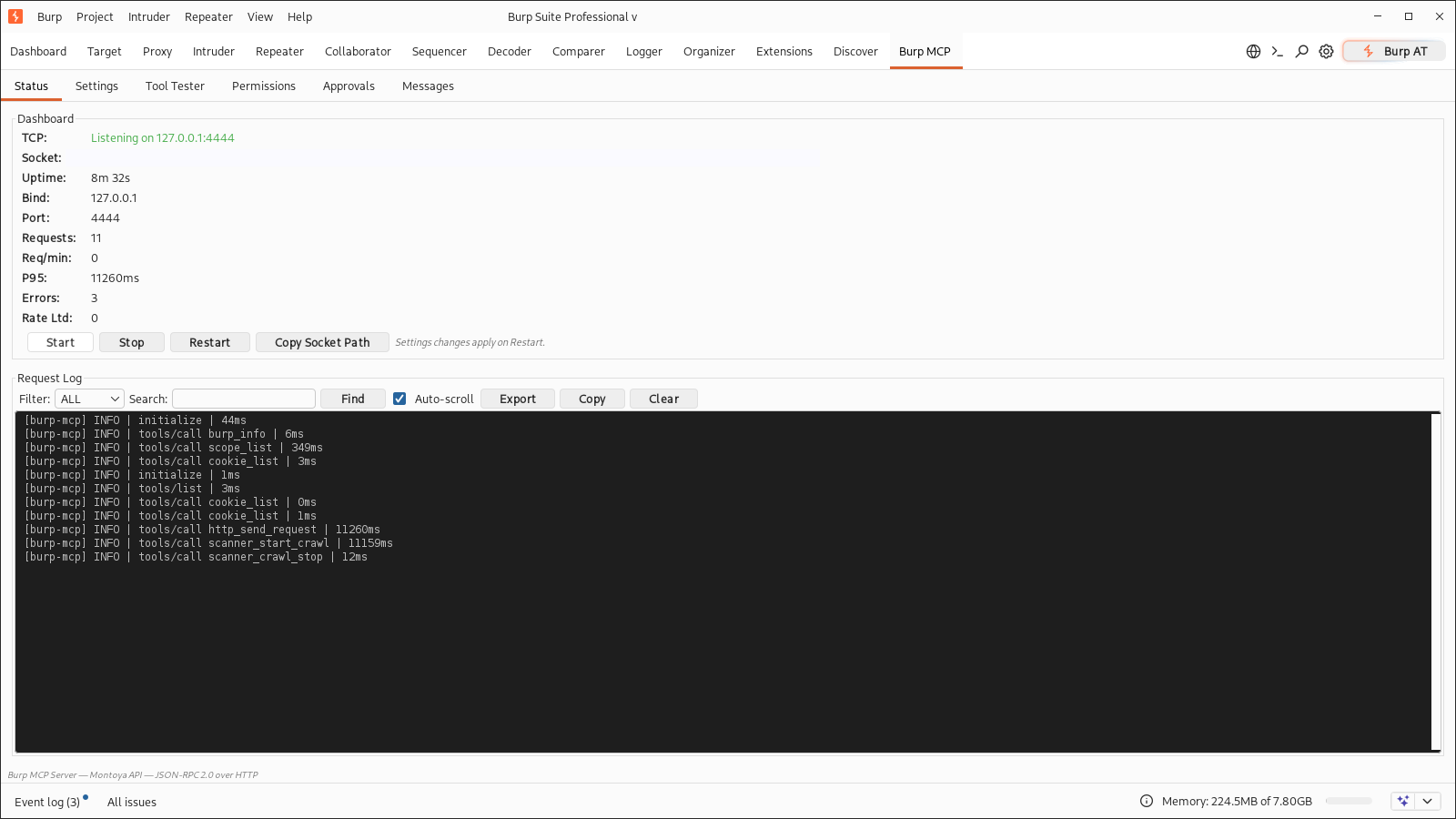
A Burp Suite extension that exposes your running Burp as MCP tools. An AI agent can send HTTP requests, read proxy history and the site map, drive the scanner, and hand requests to Repeater, Intruder, Comparer, or Organizer.
It runs in Burp's JVM and speaks JSON-RPC 2.0 over HTTP, on TCP or a per-project Unix socket.
| Component | Value |
|---|---|
| Host | Burp Suite Community or Professional |
| Tools | 53 across HTTP, proxy, sitemap, scope, scanner, Collaborator, Organizer, config |
| Transports | TCP on 127.0.0.1:4444, plus a Unix socket per project |
| Professional-only | Scanner, crawler, and Collaborator tools |
| Clients | Any MCP client that can POST JSON-RPC to an HTTP URL |
Download burp-mcp-server.jar from the
latest release, or build current
main:
git clone https://github.com/N0K0/burp-mcp.git
cd burp-mcp
mvn clean package -DskipTests
JDK 17 or newer and Maven 3.9 or newer are required. The build writes
target/burp-mcp-server.jar.
Load it under Extensions -> Installed -> Add -> Java. Burp does not reload
Java extensions, so remove and re-add the entry after a rebuild. On WSL with
/mnt/c present, the build also copies the jar to
C:\Users\nikolas\Downloads\.
# list the tools
curl -s -X POST -H "Content-Type: application/json" \
  -d '{"jsonrpc":"2.0","method":"tools/list","id":"1"}' \
  http://127.0.0.1:4444/

# ask Burp about itself
curl -s -X POST -H "Content-Type: application/json" \
  -d '{"jsonrpc":"2.0","method":"tools/call","params":{"name":"burp_info","arguments":{}},"id":"2"}' \
  http://127.0.0.1:4444/

# health check
curl -s http://127.0.0.1:4444/health
The same calls work over the Unix socket. Get the path from burp_info ->
mcpSocketPath, or from the Status tab:
SOCK=$(curl -s -X POST -H "Content-Type: application/json" \
  -d '{"jsonrpc":"2.0","method":"tools/call","params":{"name":"burp_info","arguments":{}},"id":"1"}' \
  http://127.0.0.1:4444/ \
  | python3 -c "import json,sys; print(json.loads(json.load(sys.stdin)['result']['content'][0]['text'])['mcpSocketPath'])")

curl -s --unix-socket "$SOCK" http://localhost/health
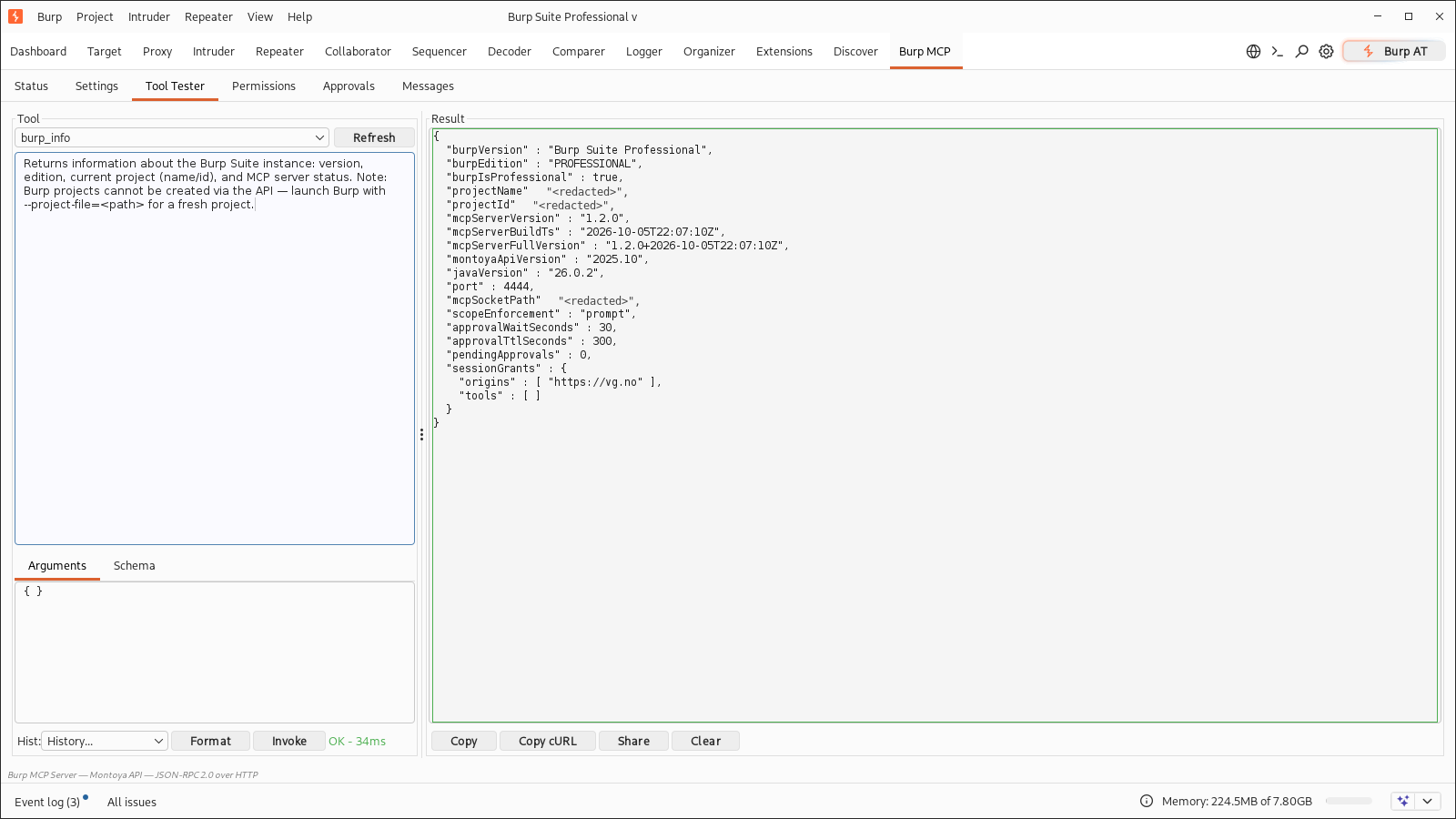
The Tool Tester shows the same output; burp_info also reports the active
access-control state (scope enforcement, approval timing, pending requests, and
session grants) so an agent can see why a call was blocked:
The extension runs inside Burp's JVM on the Montoya API, so an agent works on the project you have open: the same proxy history, site map, scope, cookies, and Professional license.
It adds a "Burp MCP" tab with six screens: Status (Start/Stop/Restart, metrics, request log), Settings, Tool Tester, Permissions, Approvals, and Messages.
PortSwigger ships an official MCP server (Kotlin, GPL-3.0). Both let MCP clients drive Burp; they make different tradeoffs. Official details below are from its repository as of October 2026.
| Aspect | PortSwigger official | This extension |
|---|---|---|
| Transport | MCP over SSE on 127.0.0.1:9876, plus a bundled stdio proxy |
JSON-RPC over HTTP POST on TCP :4444 and a per-project Unix socket |
| Tools | 27 (24 on Community) | 53 (42 on Community) |
| Several Burp projects | one port per instance, set per instance in its MCP tab | one socket per project, automatic |
| Safety | approval dialog before requests and data access, by default | policy modes: read-only, prompt, custom per tool, sensitivity gate; out-of-scope targets prompt before traffic is sent |
| Auth and TLS | none | optional Bearer token and TLS |
| Operations | Burp's extension log | health endpoint, Prometheus metrics, JSON logs, rate limits, circuit breakers, Start/Stop/Restart |
The tool sets overlap but are not identical. The official server has
get_active_editor_contents / set_active_editor_contents (the focused
message editor, for tight human-in-the-loop work), generate_random_string,
and HTTP/2 Repeater tabs. This one adds the scanner workflow
(scanner_start_audit, scanner_start_crawl, crawl status/stop,
scanner_bcheck_import, scanner_generate_report), scope control,
sitemap_search, the cookie jar, http_diff_responses,
http_keyword_search, and the Organizer/Comparer/Decoder handoffs.
Use the official server when you want the supported default, per-call approval dialogs, or an SSE/stdio-only client. Use this one when you want the larger tool set, several Burp projects at once, pre-authorized read-only or custom access for unattended runs, or auth, metrics, and logs.
TCP listens on mcp_port, 4444 by default.
The Unix socket is on by default next to the open project file, so
~/burp-projects/exness.burp gets ~/burp-projects/exness.sock. Each project
gets its own socket, and several Burp instances can run at once. Temporary
projects, unlocatable project files, and over-long paths fall back to
<tmp>/burp-mcp-<hash>.sock. Set socket_path or BURP_MCP_SOCKET_PATH to
override; set socket_enabled=false to disable.
If another process holds 4444, this instance keeps serving on its socket and the Status tab reports the conflict. Close the other instance and press Restart.
Both transports use the same HTTP JSON-RPC, including auth, permissions, rate
limits, and /health. The socket handles one request per connection
(Connection: close), is owner-only, and is removed on Stop, Restart, or
unload; a crash leaves a stale file that the next start replaces. Python
clients need an AF_UNIX connector; curl --unix-socket works as is.
53 tools. Aliases work too: proxy_list maps to proxy_history_list,
send_request to http_send_request. Permissions and metrics use canonical
names, so disabling a tool also disables its aliases.
| Tool | What it does |
|---|---|
http_send_request |
Send a URL as GET, or a complete raw HTTP message. Redirect, timeout, and HTTP version options. |
http_send_requests |
Send several raw requests in parallel. |
http_build_request |
Build a request from method, URL, headers, and body. Returns the raw message and a request_id. |
http_modify_request |
Add or remove headers, replace the body, or change the method. |
http_parse_request |
Split a raw request into method, URL, path, query, headers, body, and HTTP version. |
http_parse_response |
Split a raw response into status, headers, body, MIME type, and cookies. |
http_store_request |
Cache a raw request for later. |
http_get_request |
Fetch a cached request by request_id. |
| Tool | What it does |
|---|---|
proxy_history_list |
List captured HTTP requests; filter by URL prefix, method, or status. |
proxy_history_get |
Fetch one proxy history entry by ID. |
proxy_websocket_history_list |
List WebSocket messages captured by the proxy. |
websocket_history_get |
Fetch one WebSocket message by index. |
sitemap_list |
List site map entries, optionally in-scope only. |
sitemap_list_filtered |
Filter by URL prefix, host, method, or status. |
sitemap_get |
Fetch a site map entry by URL, exact or prefix. |
sitemap_search |
Regex search across request and response bodies. |
organizer_list |
List items stashed in Organizer. |
cookie_list |
Read Burp's cookie jar. |
cookie_set |
Add or update a cookie. |
| Tool | What it does |
|---|---|
http_send_to_repeater |
Open a raw request in Repeater, optionally naming the tab. |
http_send_to_intruder |
Send a request to Intruder, keeping ~ payload markers. |
http_send_to_comparer |
Send two or more strings to Comparer. |
http_send_to_decoder |
Send data to Decoder. |
http_send_to_organizer |
Stash a request in Organizer. |
logger_add |
Send a request and add the request/response to the site map. Burp has no Logger write API. |
| Tool | What it does |
|---|---|
scanner_start_audit |
Active or passive audit of seed URLs, with optional headers such as cookies. Burp stamps its own User-Agent on generated traffic. |
scanner_issues_list |
List every issue in the site map. |
scanner_issues_list_filtered |
Filter issues by URL prefix or severity. |
scanner_get_issue |
Full details for one issue, by URL and optional name. |
scanner_generate_report |
Write an HTML or XML report; returns the path. |
scanner_bcheck_import |
Load a BCheck from text or a file. |
scanner_start_crawl |
Crawl from seed URLs; returns a crawl_id. |
scanner_crawl_status |
Poll request and error counts. Burp does not implement the crawl status message. |
scanner_crawl_stop |
Stop and delete a crawl. |
task_engine_status |
Check whether Spider and Scanner are running or paused. |
task_engine_set |
Pause or resume Spider and Scanner. |
| Tool | What it does |
|---|---|
collaborator_generate_payload |
Generate a unique Collaborator payload, with up to 16 alphanumeric characters of custom data. |
collaborator_interactions |
Poll interactions for a payload, filtered by DNS, HTTP, SMTP, and other types. |
| Tool | What it does |
|---|---|
scope_check |
Is this URL in Burp's target scope? |
scope_list |
Show include rules plus in-scope URLs seen in sitemap traffic. |
scope_set |
Add or remove include/exclude rules. |
burp_info |
Burp version and edition, project name and ID, and the live socket path. |
project_create |
Returns a command to launch a new .burp file; the API cannot create projects. |
config_get |
Export Burp configuration as JSON, project or user scope. |
config_set |
Import Burp configuration from JSON. |
config_list_preferences |
Dump the extension's settings. |
proxy_intercept_status |
Check whether proxy interception is on. |
proxy_toggle_intercept |
Turn proxy interception on or off. |
| Tool | What it does |
|---|---|
decoder_decode |
Decode base64, URL, or hex. |
decoder_encode |
Encode to base64, URL, or hex. |
http_diff_responses |
Compare two responses; report what differs and what stays the same. |
http_keyword_search |
Find keywords that appear in all responses and ones that appear in only some. |
burp_metrics returns uptime, request counts, latency percentiles, per-tool
counts, cache hit rate, and active connections. The same numbers are at
GET /health?format=prometheus.
Prompt: "Map everything under https://shop.example.test and look at the
checkout flow." The agent alternates between reading Burp's state and sending
requests:
scope_check on the seed.sitemap_list, sitemap_search, and proxy_history_list for what Burp
already captured.http_send_request to cover gaps and exercise checkout.http_send_to_repeater or http_send_to_organizer for manual follow-up.scanner_start_audit, then
scanner_issues_list_filtered at severity HIGH, scanner_get_issue, and
scanner_generate_report.collaborator_generate_payload, use the payload, then
collaborator_interactions.The extension runs nothing on its own; every call goes through the permission rules below.
Any MCP client that supports remote HTTP servers works.
Hermes:
# ~/.hermes/config.yaml
mcp_servers:
  burp:
    url: http://127.0.0.1:4444
Claude Desktop:
{
  "mcpServers": {
    "burp": {
      "url": "http://127.0.0.1:4444"
    }
  }
}
opencode:
{
  "mcp": {
    "servers": {
      "burp": {
        "type": "remote",
        "url": "http://127.0.0.1:4444/"
      }
    }
  }
}
Custom clients POST JSON-RPC to / with initialize, tools/list, and
tools/call. GET /health returns {"status":"ok"} or {"status":"error"}.
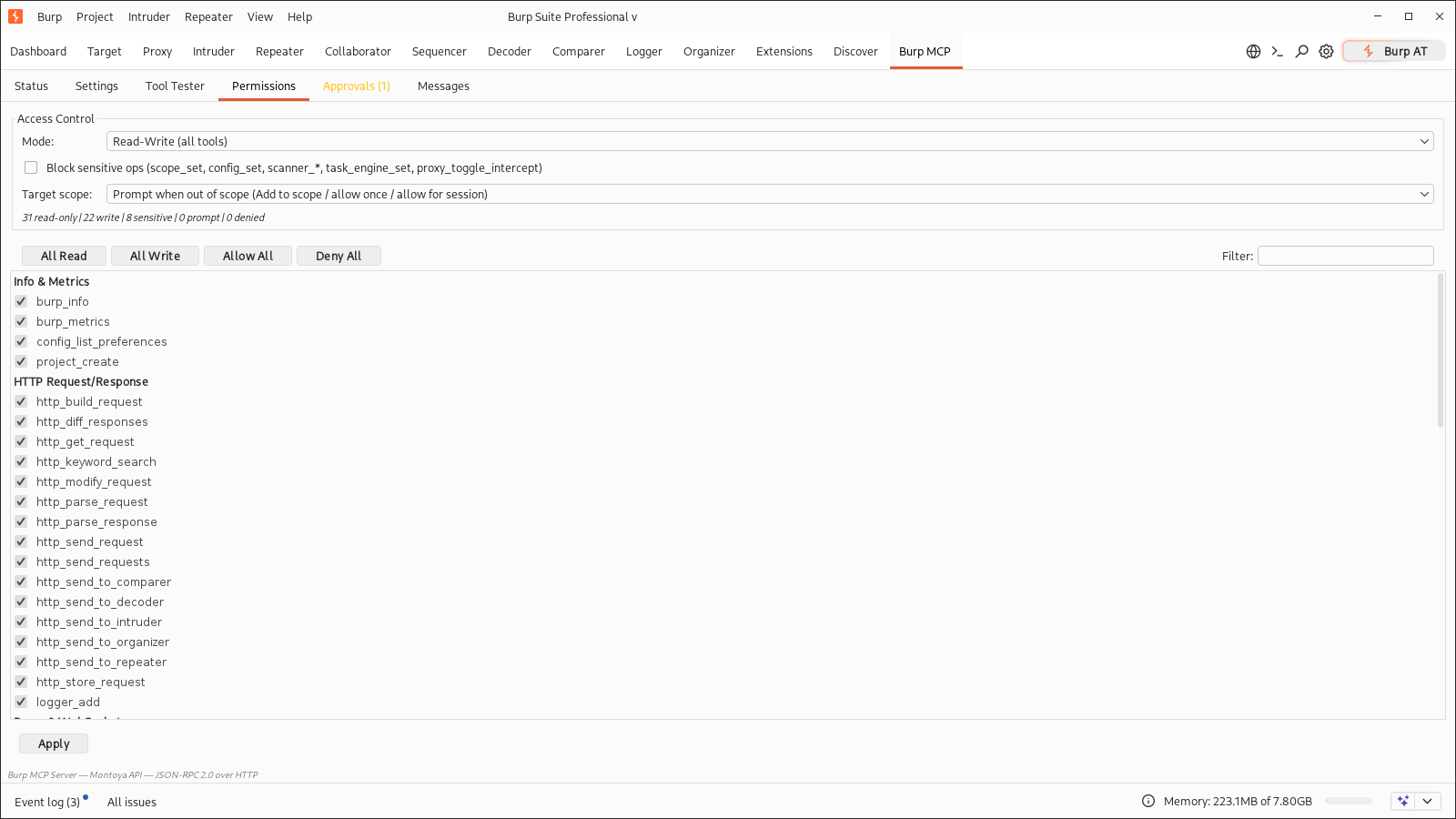
Four modes in the Permissions tab:
burp_info, project_create,
burp_metrics, sitemap_*, proxy_history_*, proxy_intercept_status,
proxy_websocket_history_list, websocket_history_get, scope_check,
scope_list, organizer_list, task_engine_status,
scanner_crawl_status, cookie_list, decoder_*, http_parse_*,
http_get_request, http_diff_responses, http_keyword_search,
config_get, config_list_preferences, the scanner issue reads, and
collaborator_interactions.The sensitivity switch blocks scope_set, config_set,
scanner_start_audit, scanner_start_crawl, scanner_crawl_stop,
scanner_bcheck_import, task_engine_set, and proxy_toggle_intercept in
every mode; it never downgrades a block to a prompt.
When a call needs approval, the Approvals tab shows a card (and a dismissible popup) with the tool, targets, and arguments:
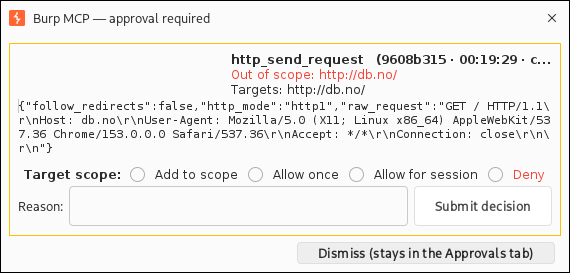
The decision (including the deny reason) is returned to the agent harness.
"Allow for session" grants last until the extension is reloaded or the grants
are cleared in the Approvals tab. The gated call waits approval_wait_seconds
for a decision; if nobody answers it returns -32008 APPROVAL_PENDING and the
agent retries the same call, so nothing executes after the client has stopped
waiting. Pending requests expire after approval_ttl_seconds.
Target-scope enforcement covers the traffic-sending tools
(http_send_request, http_send_requests, logger_add,
scanner_start_audit, scanner_start_crawl). It defaults to prompt:
out-of-scope traffic waits for the operator. If Burp's target scope is empty,
every target counts as out-of-scope. Set scope_enforcement=deny to refuse
out-of-scope calls with -32010 and no dialog, or off to disable the check.
BURP_MCP_SCOPE_ENFORCEMENT=off does the same for automation. Redirect hops
are not pre-checked, and the scanner follows Burp's own scope rules once
seeded.
http_send_to_* staging tools and other non-sending tools are not
scope-gated. Scanner and crawler tools generate real traffic against the
target.
Burp stores these in extension preferences, so they survive restarts. The
Settings tab exposes all of them with JSON export/import. Exports omit
auth_token and tls_keystore_password.
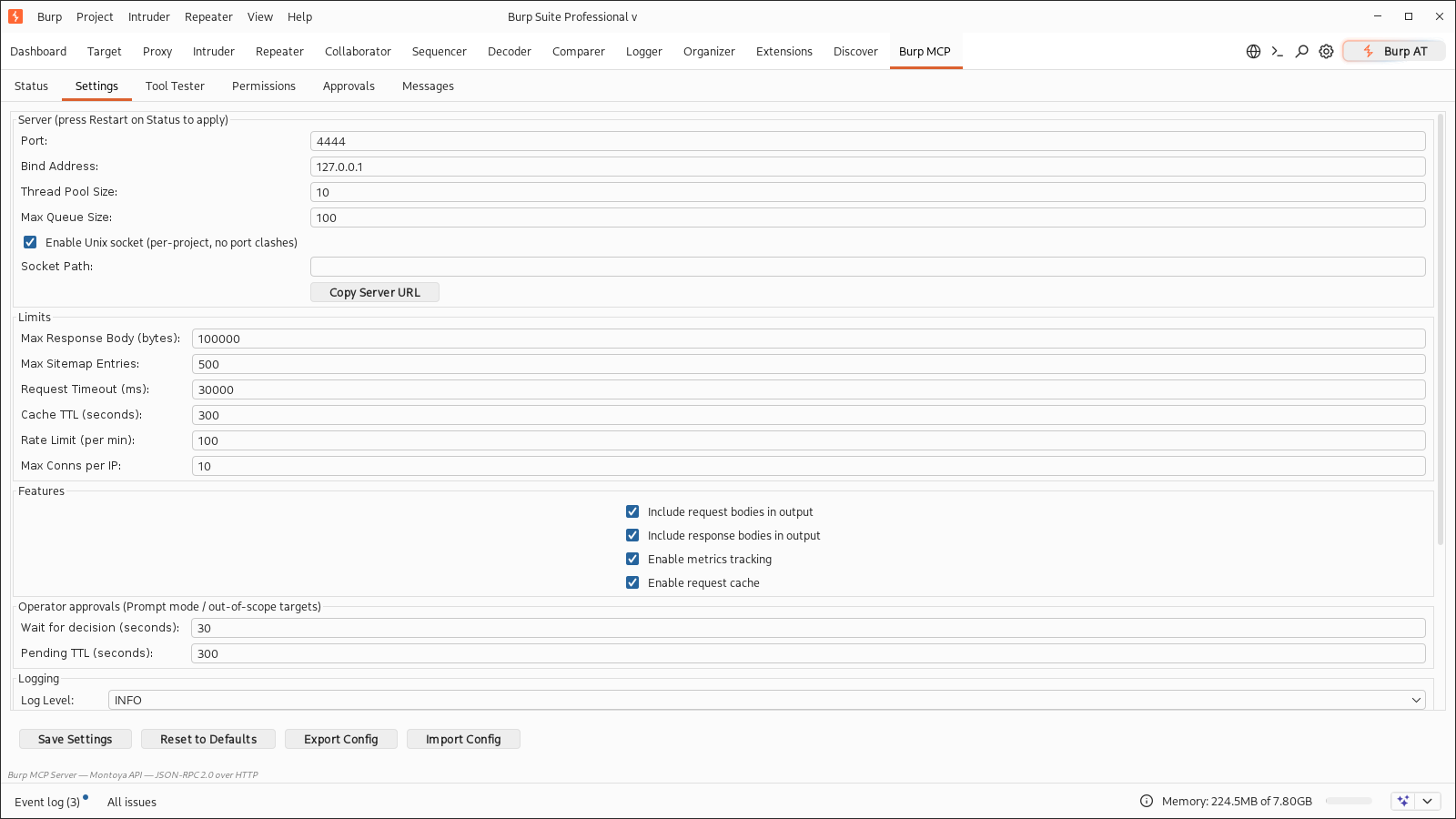
| Key | Default | What it does |
|---|---|---|
mcp_port |
4444 | TCP listen port (1-65535) |
bind_address |
127.0.0.1 | Interface to bind |
thread_pool_size |
10 | Worker threads (1-50) |
max_queue_size |
100 | Queue depth (1-1000) |
max_response_body_bytes |
100000 | Truncates tool output (1000-100M) |
max_sitemap_entries |
500 | Site map list cap (>0) |
request_timeout_ms |
30000 | HTTP timeout (1000-300K) |
cache_ttl_seconds |
300 | Cache TTL; 0 turns off timer cleanup (0-86400) |
rate_limit_per_minute |
100 | Per-IP limit; 0 disables (0-10000) |
max_connections_per_ip |
10 | Concurrent connections per IP; extras get 503 (1-100) |
socket_enabled |
true | Serve on a Unix socket alongside TCP |
socket_path |
(empty) | Explicit socket path; empty means next to the .burp project file |
log_level |
INFO | DEBUG, INFO, WARN, or ERROR |
logging_file_path |
(empty) | JSON-lines log path; empty means ~/burp-mcp-error.log |
include_request_body |
true | Include request bodies in tool output |
include_response_body |
true | Include response bodies in tool output |
metrics_enabled |
true | Collect metrics (applied on Start/Restart) |
cache_enabled |
true | Use the request cache |
audit_log_enabled |
false | Extra audit logging |
auth_enabled |
false | Require a Bearer token |
auth_token |
(none) | Token value; never exported |
tls_enabled |
false | Serve HTTPS |
tls_mode |
self_signed | self_signed or custom |
tls_keystore_path |
(none) | PKCS12 path for custom mode |
tls_keystore_password |
burpmcp | Keystore password |
scope_enforcement |
prompt | Out-of-scope traffic: prompt, deny, or off |
approval_wait_seconds |
30 | How long a gated call blocks for a decision (5-600) |
approval_ttl_seconds |
300 | How long an undecided request stays queued (30-3600) |
approval_popup_enabled |
true | Pop a dialog for new approval requests (always listed in the tab) |
Environment variables win over stored preferences:
BURP_MCP_PORT=4444
BURP_MCP_BIND_ADDRESS=127.0.0.1
BURP_MCP_AUTH_TOKEN=secret
BURP_MCP_LOG_LEVEL=INFO
BURP_MCP_SOCKET_PATH=/tmp/burp-proj-a.sock
BURP_MCP_SCOPE_ENFORCEMENT=off
BURP_MCP_APPROVAL_WAIT_SECONDS=30
BURP_MCP_APPROVAL_TTL_SECONDS=300
Bad values are logged at startup as Invalid config: .... An empty token
with auth_enabled=true blocks serving.
Auth is a single Bearer token:
mcp_servers:
  burp:
    url: https://127.0.0.1:4444
    headers:
      Authorization: Bearer <token>
TLS is off by default. Set tls_enabled=true, then self_signed for local
work or custom with a PKCS12 keystore; custom without a path fails at
startup.
curl http://127.0.0.1:4444/health
curl http://127.0.0.1:4444/health?format=prometheus
Health stays unauthenticated so monitoring can poll it.
Inbound bodies cap at 10 MB and tool output truncates at
max_response_body_bytes. Rate limiting is per socket IP, and
X-Forwarded-For is ignored because clients can spoof it. The connection cap
returns 503 with -32007. Tools that call outside Burp get a circuit
breaker: five failures in 60 seconds open it for 30 seconds, then one probe
decides whether to close it.
Logs are JSON lines with a correlation ID per call, filtered by log_level;
the file copy rotates at 5 MB and keeps three backups.
Errors come back as JSON-RPC codes:
| Code | Meaning |
|---|---|
-32001 |
Pro-only tool on Community |
-32002 |
Bad params |
-32003 |
Unknown method or tool |
-32004 |
Request failed (DNS, timeout, refused) |
-32005 |
Auth or permission denied (deny reason in data.reason) |
-32006 |
Rate limited (429) |
-32007 |
Server busy (HTTP 503: connection cap or saturated pool) |
-32008 |
Approval pending — retry the same call to collect the decision |
-32009 |
Approval expired or was cancelled before a decision; nothing ran |
-32010 |
Target out of scope (scope_enforcement=deny); add it or ask the operator |
A malformed Content-Length or truncated body returns 400, not 500.
The Status tab has Start, Stop, and Restart. Restart re-reads saved settings, so port, bind address, TLS, socket, and pool changes apply without reloading the extension.
| Symptom | Cause | Fix |
|---|---|---|
| Extension will not load | Corrupt preference or bad port | Check Burp's output for Invalid config; fix in Settings |
| Agent cannot connect | Wrong port, or another program owns it | curl http://127.0.0.1:4444/health; if that fails, the instance is socket-only and the Status tab says why |
| Port busy | Another Burp instance holds 4444 | This instance keeps serving on its socket; close the other, press Restart, or change mcp_port |
| Tools look stale | Burp kept the old jar loaded | Remove and re-add the extension |
-32001 on scanner |
Community edition | Scanner and Collaborator need Professional |
401 on every call |
Wrong token | Copy the token from Settings; check BURP_MCP_AUTH_TOKEN |
503 auth misconfigured |
auth_enabled=true, empty token |
Set a token, then Start or Restart |
429 |
Rate limit hit | Wait for Retry-After, raise the limit, or set it to 0 |
-32008 on a send |
Approval pending, nobody answered in time | Answer in the Approvals tab and let the agent retry, or raise approval_wait_seconds |
| Every send prompts | Burp's target scope is empty | Add targets to scope (or click Add to scope on the card), or set scope_enforcement=off |
| Empty proxy history | No traffic yet | Browse through Burp first |
| TLS errors with self-signed | Missing SAN in older certificates | Use a custom PKCS12 or trust the certificate |
mvn clean compile
mvn test                      # 180 unit and mocked-transport tests
mvn clean package -DskipTests
No Maven wrapper is checked in. Tests use JUnit 5 and AssertJ, and the integration suite starts a real NanoHTTPD on a random port.
LiveBurpIT is excluded from normal runs and needs Burp with the extension
loaded:
BURP_MCP_TEST_BASE_URL=http://127.0.0.1:4444 mvn test -Dtest=LiveBurpIT
Optional: BURP_MCP_TEST_AUTH_TOKEN for a Bearer token,
BURP_MCP_TEST_ALLOW_SCANS=1 to include the crawl test on Professional. The
suite starts its own loopback targets, cleans up the scope subtree it uses,
backs off on 429, and skips when Burp is unreachable.
Conventions and project layout are in AGENTS.md.
The server binds to loopback by default. Opening bind_address to 0.0.0.0
without auth or TLS exposes Burp to your network. The tools act with your
Burp session's access, so treat an MCP client like any other operator at your
keyboard. Use Read-Only mode and the sensitivity switch for passive work, or
Prompt mode plus scope enforcement to review writes and out-of-scope traffic
before they run.
MIT